Every project schedule starts with a clear, granular understanding of what exactly needs to get done. Before you can estimate durations, sequence tasks, or assign resources, you must define activities for your project schedule by translating high‑level deliverables into the specific, executable chunks of work that team members will perform. This process is often misunderstood as mere list‑making, but it is actually a disciplined decomposition that connects your scope baseline to the day‑to‑day reality of project execution. In the Project Management Body of Knowledge, this falls under the Time Management knowledge area within the Planning Process Group, but its influence ripples across cost, risk, and resource planning. If you skip the rigor here, you end up with a schedule that looks plausible on a Gantt chart but crumbles the moment real work begins, because nobody knows who is actually doing what or when one activity truly hands off to another. The good news is that by following a structured approach driven by your Work Breakdown Structure and leveraging a handful of practical techniques, you can build an activity foundation that keeps your schedule honest, your estimates credible, and your team aligned from day one.
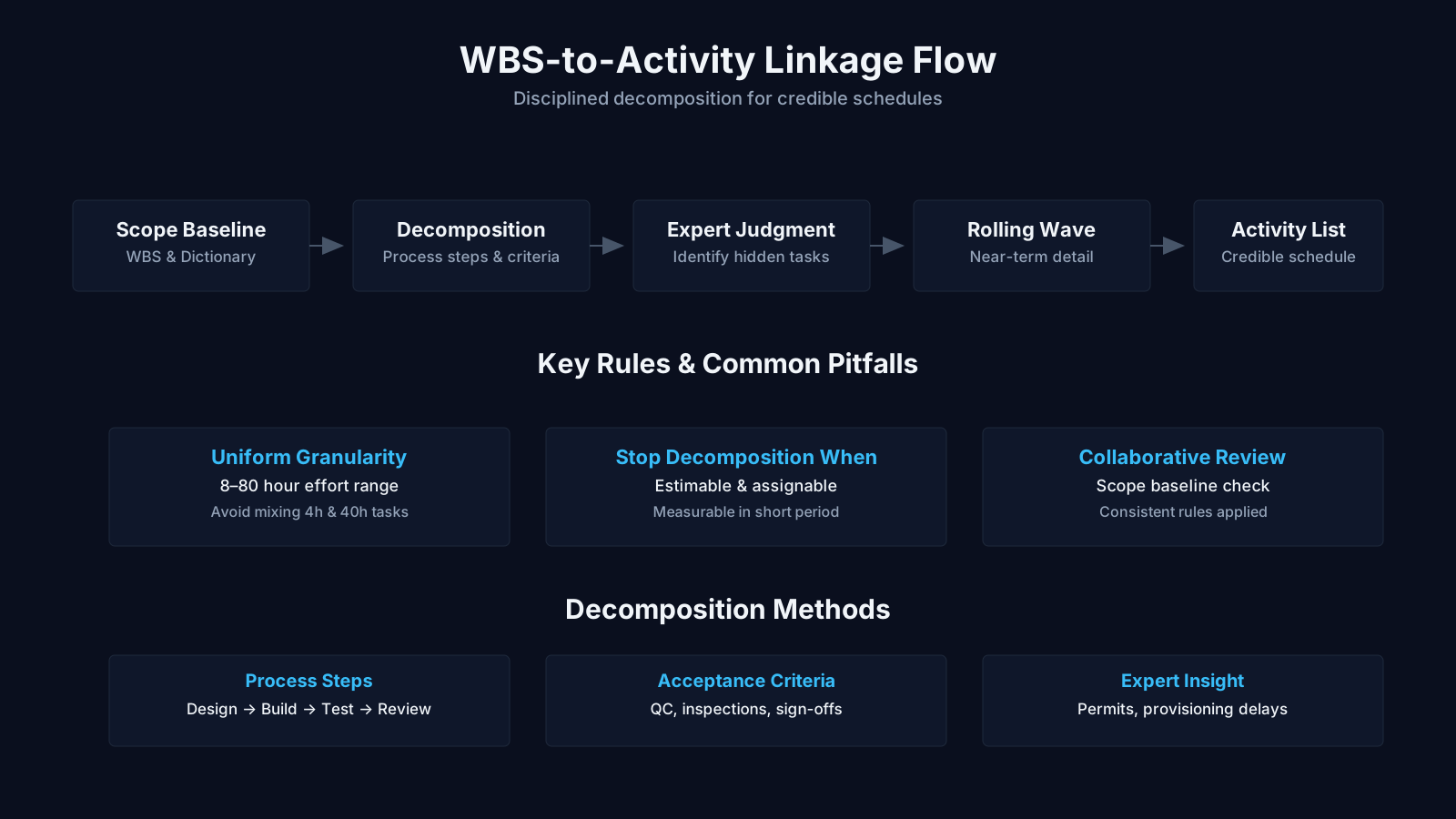
How to Define Project Activities: Summary
| Key Concept | Summary |
|---|---|
| Activity Definition | Decomposing high-level deliverables into discrete, actionable activities establishes a schedule that is both realistic and clearly accountable. |
| WBS Synergy | On complex engagements, the Work Breakdown Structure and activity list mature in parallel, avoiding the pitfalls of treating them as strictly sequential steps. |
| WBS Dictionary | Acceptance criteria, constraints, and assumptions recorded in the WBS dictionary directly shape which activities emerge during decomposition, anchoring the schedule in verified requirements. |
| Vertical Traceability | A clear line of sight from work packages to activities underpins effective earned value management and enables meaningful progress tracking. |
| Tooling Balance | Advanced scheduling tools enable rich data capture, yet they can encourage over-engineering the activity list before the fundamental workflow is validated. |
| Organizational Factors | Organizational culture and stakeholder expectations dictate granularity; some environments demand significantly more discrete effort breakdowns than others. |
| Reusable Patterns | Historical activity patterns from analogous projects supply proven templates and surface recurring pitfalls such as rollback testing. |
| Richer Breakdown | Thorough decomposition transforms content deliverables into manageable tasks: drafting, reviewing, recording, and editing, ensuring no critical step is omitted. |
Connecting Your WBS to the Activity Definition Process
Defining activities does not happen in a vacuum. It lives downstream from the Create WBS process, which identifies the lowest‑level deliverables called work packages. A work package might be something like “User Authentication Module” or “Foundation Excavation,” but a deliverable on its own does not tell you the discrete actions required to produce it. That is where activity definition comes in: you take each work package and break it into smaller, schedule‑able components. The essential link here is that work packages become the source of project schedule activities through decomposition. Without a sound WBS, your activity list will either be incomplete or will contain orphaned tasks that trace back to no approved deliverable, creating scope creep hidden within your timeline.
Many project managers treat the WBS and activity list as sequential artifacts, but in practice, they often evolve concurrently, especially on complex projects where the WBS dictionary adds clarifying detail about acceptance criteria, constraints, and assumptions. The WBS dictionary is particularly valuable here because it preserves the “what” of each work package while you puzzle out the “how” through activities. For instance, if the WBS dictionary specifies that the “User Authentication Module” must support biometric login and comply with SOC2, your decomposition will naturally surface activities like “Design biometric API integration,” “Implement audit logging for authentication events,” and “Test compliance checkpoint scenarios.” Each of those activities becomes a measurable unit of work that you can then schedule, estimate, and assign.
The relationship flows both ways. As you decompose, you may discover missing deliverables or realize a work package is too vague, triggering updates to the WBS before you finalize the activity list. This iterative refinement is healthy, and it prevents the all‑too‑common scenario where a project manager marches into scheduling with a brittle, pre‑frozen WBS that contains unresolved ambiguity. Remember that the activity list is not an expansion of the WBS; it describes the effort needed to complete the work packages, and each activity must ultimately roll up to exactly one work package. This vertical traceability is what makes earned value management and progress tracking possible later, so treat it as a non‑negotiable design principle, not a bureaucratic checkbox.
Core Insights on WBS-Driven Activity Planning
- Work packages as activity source
- Each work package from the WBS is broken down into discrete, schedulable activities that precisely outline the steps required to complete the deliverable.
- Risks of weak WBS foundation
- An inadequate WBS leads to incomplete activity lists or orphaned tasks lacking a deliverable, quietly embedding scope creep into the schedule.
- Concurrent evolution of artifacts
- On complex projects, the WBS and activity list evolve in tandem through iteration; the WBS dictionary provides clarifying detail on acceptance criteria, constraints, and assumptions that directly influence how activities are decomposed.
- Vertical traceability as an essential principle
- Ensuring clear vertical traceability from each activity to its work package is a foundational principle that enables earned value management and reliable progress tracking throughout the project lifecycle.
Inputs That Shape Your Activity Definition Decisions
Before you start whiteboarding sticky notes or typing into your scheduling tool, you need the right raw materials. The first and most critical input is the scope baseline, which bundles the project scope statement, the WBS, and the WBS dictionary. This three‑part document gives you the formal boundaries within which your activities must live. The project scope statement records deliverables, constraints, and assumptions that directly influence which activities you define and which you consciously exclude. For example, a constraint that the system must go live before a regulatory deadline forces you to define activities related to compliance certification early in the timeline. Assumptions about third‑party API availability may lead you to include a validation activity that checks whether the external service is actually accessible before you build against it.
Enterprise environmental factors also play a subtle but powerful role. The project management information system (PMIS) you use can shape the granularity and format of your activity definitions. A sophisticated scheduling tool that supports hierarchical activity codes and attribute‑based filtering will let you capture richer data from the start, but it also creates the temptation to over‑engineer the activity list with every possible attribute before the team has proven the basic workflow. On the other hand, a lightweight spreadsheet might force you to be more disciplined about what you record, but it can become a maintenance nightmare on large programs. Environmental factors like organizational culture and stakeholder expectations further affect how you decompose: a firm that prefers highly auditable, discrete effort breakdowns will push for more granular activities than one that trusts teams to self‑organize within broader work packages.
Organizational process assets are where you can really accelerate the work while learning from the past. These assets include formal scheduling methodologies, templates, and especially the lessons‑learned knowledge base housing historical activity lists from similar projects. If your organization has repeatedly delivered e‑commerce platform upgrades, there is a goldmine of reusable activity patterns capturing not just the tasks but the common pitfalls, like “Database schema migration always requires a rollback test activity that we forgot the first three times.” Using these assets also reduces the cognitive load on your experts, because they do not need to reinvent recurring work sequences from scratch. But beware: templates can carry forward stale assumptions (like a legacy testing phase that no longer applies) so you must validate them against the current project’s scope baseline rather than blindly adopting what worked last year.
Decomposition: The Core Technique for Breaking Down Work Packages
Decomposition is the primary tool for turning work packages into manageable, schedule‑ready activities. The idea is straightforward but the execution demands nuance. You subdivide each work package into smaller components that represent the effort needed to complete that package, and you do it with the team members who will actually perform the work. Their involvement is not just a morale gesture; experts who have done the job can spot dependencies and hidden tasks that a high‑level planner would miss. When you apply decomposition of work packages into schedule activities, you are effectively translating a deliverable‑oriented breakdown into an action‑oriented one, and the accuracy of your estimates and logic later depends on how well you capture the real sequence of effort.
Imagine a work package called “Training Materials Development” for a software deployment project. A naive decomposition might yield three activities: “Write user manual,” “Record video tutorials,” and “Print handouts.” But a seasoned trainer would challenge that immediately. They would ask about review cycles, subject matter expert availability, translation needs, and whether the training environment must be ready before screen recording can begin. So you end up with a richer set: “Conduct SME interviews for content outline,” “Draft user manual chapters,” “Perform technical review,” “Incorporate review feedback,” “Record screencasts in staging environment,” “Edit and caption videos,” “Design and print quick‑reference cards,” and so on. Without this depth, schedulers assume a linear progression that reality will never honor, and the project timeline becomes a fiction.
A common pitfall here is confusing a summary description with a real activity. “Design database schema” sounds tidy but may hide dozens of sub‑steps that need to be visible for sequencing and risk analysis. The art is to decompose enough so that each activity can be assigned to a single responsible party, requires a discrete set of resources, and has a clear completion criterion. At the same time, you must resist the micromanager’s urge to fragment everything into hourly sub‑tasks, because excessive detail overwhelms the schedule and makes it brittle to change. The rule of thumb many experienced program managers live by is the “two‑week rule”: if an activity cannot be estimated with any confidence beyond two weeks of effort, it probably needs further decomposition.
From a BVOP perspective, the strict waterfall‑style decomposition of a fixed WBS can be risky because it treats the scope as perfectly knowable at the start. BVOP promotes a five‑level scope scale (Definite, High Probability, Moderate, Low, and Unlikely) and uses relational effort points rather than granular task breakdown for uncertain items. This means that for work packages in the “Moderate” or “Low” confidence zones, you might not fully decompose them upfront; instead you define placeholder activities with wide estimation ranges and treat scope discovery as user feedback rather than a planning failure. This can be a pragmatic escape hatch for teams who realistically cannot nail down every detail before they begin, and it aligns with rolling wave thinking.
Core Takeaways on Decomposition
- Expert team involvement
- When decomposition is driven by those who will execute the work, it surfaces tacit knowledge and hidden dependencies that high-level planners typically overlook.
- Action-oriented translation
- By converting deliverable-focused work packages into a concrete sequence of schedule activities, decomposition sharpens duration estimates and strengthens the logic linking work elements.
- Balanced granularity
- Excessive fragmentation leads to brittle, maintenance-heavy schedules, so decomposition must remain at a level that is both practical to manage and resilient to change.
- Progressive decomposition
- For uncertain work, using provisional activities with broad time allocations treats emerging scope as normal feedback, avoiding the risk of a premature, rigid breakdown.
Rolling Wave Planning as a Progressive Elaboration Strategy
Not every activity can be defined in detail on day one of planning, and insisting on it can drive a project into analysis paralysis. This is where rolling wave planning earns its place as a critical companion to decomposition. It is a form of progressive elaboration where work that lies in the near term is decomposed into full activity lists, while rolling wave planning for future project phases keeps later work at a higher, less granular representation, typically at the milestone or work package level. As you gain more information from early execution, you elaborate the upcoming waves, converting placeholder tasks into real activities with attributes, dependencies, and refined estimates.
For example, consider a construction project with a multi‑year roadmap. The design and foundation phases might be fully decomposed now because the engineering drawings are approved and the soil reports are in hand. The interior finishing phase, however, will depend on decisions that the client hasn’t yet made about materials and layout, so it is currently represented only as a set of milestones like “Finish Drywall” and “Complete Electrical Rough‑In.” As the project advances and the client signs off on options, the team conducts a new session to decompose those milestones into actual electrical circuitry activities, drywall hanging steps, and inspection coordination tasks. Rolling wave planning respects the reality that knowledge is asymmetrical across the timeline and prevents wasted effort from planning activities that are highly likely to change.
When you blend decomposition with rolling wave planning, you need a clear governance rule for what triggers further decomposition. Often, the trigger is a date gate or a deliverable completion event; for instance, when the detailed design document is approved, the development team will decompose the next wave of coding activities. But you also must keep an eye on lead times: if a long‑lead procurement item needs to be ordered months in advance, its related installation activities cannot remain vague until the last minute, otherwise you risk resource gaps. So the rolling wave approach requires you to continuously sense the planning horizon and ensure that no activity with irreversible commitments remains unpacked.
Accelerating Activity Definition with Templates and Expert Judgment
You do not have to derive every activity from first principles. Mature organizations accumulate standard activity lists or portions thereof from prior projects, which can serve as templates for new initiatives. When you use templates to define standard project activities, you import not just the activity names but often a skeleton of logic relationships, typical durations, and even resource assignments that have been validated across similar deliveries. A template for a software release might pre‑populate activities like “Conduct security vulnerability scan,” “Prepare release notes,” “Tag build in version control,” and “Obtain change advisory board approval,” each with their usual place in the sequence. This dramatically reduces the chance of omitting a subtle but critical governance step that a junior project manager might overlook.
The trap with templates is that they can become anchors that blind you to project‑specific differences. If the template assumes a monthly release cadence and your project is doing continuous delivery, many of the formal approval activities may be inappropriate. A good practice is to treat the template as a checklist for questioning, not as a finished product. Ask your team: “Does this activity still apply given our deployment approach? Could it be automated or replaced?” Similarly, activity attribute information stored in templates, such as the person responsible or the geographic location of the work, might be outdated and needs scrubbing before you commit it to your live schedule.
Expert judgment is the other acceleration lever and also the quality control mechanism. Project team members or seasoned functional managers who have repeatedly executed similar work can spot missing activities that a template would never capture, because templates reflect a static average while experts remember the exceptions. They can tell you that every time you install a new firewall at this data center, you have to coordinate with the facilities team to schedule a physical escort, an activity that is never mentioned in standard IT network deployment checklists. Using expert judgment effectively means drawing on people who combine domain depth with a working memory of past project friction, and it often works best through structured walkthroughs of the WBS rather than brainstorming in a vacuum.
Core Takeaways on Templates and Expertise
- Template reuse from prior projects
- Standard activity lists from prior projects become templates, embedding validated logic relationships, typical durations, and resource assignments directly into new project schedules.
- Templates prevent critical omissions
- Pre-populated templates for activities such as security scans and release approvals dramatically reduce the risk that a junior project manager will overlook a subtle but critical governance step.
- The anchoring trap of templates
- Templates risk anchoring teams to obsolete assumptions, causing them to overlook project-specific nuances; stored attributes such as responsible persons or locations may be outdated and need thorough scrubbing before use.
- Expert judgment fills template gaps
- Seasoned functional managers, drawing on memories of past project friction, can detect missing activities like coordinating facilities escorts for firewall installations that no static template would ever capture.
Producing the Activity List: Your Schedule’s Building Blocks
The most visible output of this entire process is the activity list, a comprehensive inventory of every schedule activity needed on the project. Each entry in the list carries an activity identifier and a scope of work description precise enough that a team member reading it knows exactly what work is required and when it can be considered done. The activity list for the project schedule is not a detailed instruction manual; it is a controlled document that answers the question “What must we do?” for every chunk of scheduleable effort. It typically aligns one‑to‑one with entries in your scheduling software, so the care you invest in crafting clear, unambiguous descriptions pays off every time someone filters or reports on the plan.
A common mistake at this stage is to write descriptions that are nothing more than a restatement of the work package name with a verb added. If the work package is “Server Rack Installation,” the activity “Install server racks” says nothing about what the effort entails. A better description would be “Unpack, rack‑mount, and cable 12 server units in Rack A3 per data center layout diagram DC‑04, and perform post‑installation power‑on test in coordination with facilities electrician.” This level of detail helps estimators avoid padding for unknowns and prevents the executing technician from discovering hidden work during the activity that the schedule did not account for.
The activity list should also be a stable reference point for communication. When a stakeholder asks why a particular milestone is delayed, you can trace back through the activity list to the specific activities in the critical path, verifying their status against the original scope description. This traceability is what separates a managed schedule from a decorative Gantt chart. And don’t forget that the activity list is not set in stone once printed; it can and should evolve as rolling wave planning reveals new activities, but all changes must go through integrated change control if the scope baseline itself is affected. If a new activity turns out to be a completely new deliverable not covered by any work package, that’s scope creep seeking formal approval.
Enriching Activities with Detailed Activity Attributes
An activity without attributes is like a recipe that lists ingredients but no quantities, oven temperatures, or step order. Activity attributes extend the description by documenting multiple components associated with each activity, and they evolve as the project progresses from planning into execution. At the outset, you might only have the Activity ID, WBS ID, and Activity Name. By the time the schedule is baselined, you will have added activity codes, detailed activity attributes for sequencing and control that include predecessor and successor activities, logical relationships, leads and lags, resource requirements, imposed dates, constraints, and assumptions.
Activity attributes also carry information that is vital for operational management. You can identify the person or role responsible for executing the work, the geographic location where the work must happen, and the activity type, which is often one of three flavors: level of effort, discrete effort, or apportioned effort. Level of effort activities, such as project management or security monitoring, span segments of the project and don’t produce a distinct end product, so their scheduling behavior differs from discrete activities that have tangible outputs. Apportioned effort activities are those whose progress is tied to another discrete activity, like quality inspection that scales with the amount of concrete poured. Getting the activity type right matters for earned value calculations because it determines how you measure physical percent complete.
The richness of activity attributes also enables sophisticated reporting. When you need to sort the schedule by responsible team, filter by location to see which tasks require on‑site presence, or highlight any activity with an external dependency, attributes make it possible without building a custom report from scratch. This is why many schedulers invest time early in defining a standard set of activity codes. For example, a code for “risk category” can link each activity to a risk register entry, so if a risk related to “vendor delivery” materializes, you can instantly pull up all activities that depend on that vendor and assess the impact. Without this level of attribute discipline, the activity list remains a flat collection of names, and the schedule loses its power as a decision support tool.
Essential Insights on Activity Attributes
- Attributes evolve from basic to detailed
- Activity attributes begin with core identifiers such as Activity ID, WBS ID, and Activity Name, then gradually incorporate successors, leads and lags, resource allocations, constraints, and assumptions as the schedule matures toward the baseline.
- Three activity types shape scheduling
- Level of effort, discrete effort, and apportioned effort activities each exhibit distinct scheduling behavior, and choosing the correct type is essential for accurate earned value tracking and percent complete calculations.
- Attributes enable flexible schedule analysis
- Well-defined attributes enable schedulers to sort by responsible team, filter by geographic location, flag external dependencies, and tie activities directly to risk register entries, removing the need for custom report development.
Capturing Milestones as Key Schedule Checkpoints
Alongside the activity list, you produce a milestone list that identifies significant points or events in the project. A milestone is not an activity with zero duration in the scheduling sense; it is a marker of achievement or decision that helps stakeholders gauge progress without wading through dozens of detailed tasks. The milestone list for project scheduling differentiates between mandatory milestones, those required by contract, regulation, or external interfaces, and optional milestones, which are based on historical patterns or management preferences. For instance, a contractual milestone might be “Client Acceptance of Intermediate Deliverable,” while an optional milestone could be “Phase 1 Lessons Learned Workshop Completed,” which adds value but won’t disrupt the contract if it slips.
Milestones serve as powerful alignment tools across teams. When you place a milestone like “System Integration Environment Available,” multiple workstreams can anchor their detailed activities to that point. In rolling wave planning, milestones become the tent poles around which future‑phase activity decomposition is organized; they give the skeleton that later flesh will attach to. However, a common misuse is to treat milestones as elaborate goal statements disconnected from defined activities. A milestone must have at least one activity completion that logically signals its achievement, and that linkage should be traceable. If you have a milestone “Regulatory Approval Obtained,” there must be activities covering application preparation, submission, and documentation, not a vague hope that the regulator will magically sign off.
The milestone list also becomes an early‑warning system during execution. When a mandatory milestone starts shifting due to accumulated activity delays, it prompts interventions that might not be triggered by looking at individual tasks alone. Program managers often couple the milestone list with their governance cadence, reviewing only the near‑term and critical milestones at steering committee meetings while letting the team manage the underlying activity details. This keeps the conversation focused on strategic decision points rather than drowning executives in task‑level noise.
Common Pitfalls and the Real‑World Rhythm of Activity Definition
Even with all the right inputs and techniques, the define activities process can go sideways in a few predictable ways. One persistent trap is over‑reliance on the PMIS to auto‑generate activities from a partially complete WBS, producing a long, intimidating list of poorly understood tasks that the team never internalizes. The tool becomes a substitute for thoughtful conversation, and soon you have a schedule that nobody trusts. Another pitfall is the “copy‑paste director,” where the project manager takes an activity list from a similar project, changes the name, and declares it done without walking through the new scope baseline with the team. This inherits every hidden assumption and context‑specific nuance, leading to tasks that don’t align with the actual deliverables.
Then there is the challenge of granularity balance. If you define activities too coarsely (everything is a multi‑month, unassignable blob), your schedule offers no control and your dependencies are meaningless. Too finely, and you create micro‑activity noise that buries meaningful variance and makes the schedule update process a full‑time job. The sweet spot is often found by asking: “Could a single person reasonably track and report progress on this activity in a weekly status meeting, and can it be completed without context switching across too many distinct deliverables?” If yes, you are in the right ballpark.
A more subtle issue arises when activity definition is performed entirely by the project manager in isolation. Without the buy‑in and detailed knowledge of the people who will execute the work, the activities will contain blind spots that surface only during execution. A site engineer will point out that “Pour Foundation” actually requires a separate permit‑inspection activity that is scheduled weeks in advance, something a manager might never think of. The fix is to make activity definition a participatory event, but also to structure that participation so it does not devolve into endless debate. A facilitated decomposition workshop with clear ground rules normally strikes the right balance.
Key Insights on Activity Definition
- PMIS over-reliance trap
- Automating activity definition from an incomplete Work Breakdown Structure in a PMIS produces sprawling task lists that the team neither understands nor takes ownership of, eroding confidence in the schedule's reliability.
- Copy-paste director pitfall
- Merely renaming a past project's activity list carries forward embedded assumptions and context-specific details, causing a mismatch between planned tasks and the actual deliverables.
- Granularity balance matters
- Coarse activity definitions eliminate meaningful control and create irrelevant dependencies, while overly fine-grained ones introduce micro-management noise that turns schedule maintenance into an excessive administrative burden.
- Single-person weekly test
- An activity's size is appropriate when a single individual can reliably track and report progress in a weekly status meeting without needing to shift focus across multiple unrelated deliverables.
- Executor buy-in requirement
- Neglecting the input of those who execute the work leaves activity definitions with hidden gaps that later surface as delays, such as a site engineer pointing out that a permit inspection must be scheduled weeks in advance.
Integrating Activity Definition into Broader Project Management Processes
The activity definition process is not an isolated planning exercise; it feeds directly into the entire scheduling, cost, and risk ecosystem. The sequence often looks like this: once you have the activity list and attributes, you sequence activities to build a network diagram, estimate activity resources and durations, and then develop the schedule. Each of these downstream processes depends on the quality of your activity definition. A poorly defined activity makes duration estimating a guessing game, because the team will pad estimates to cover undefined scope. Similarly, resource requirements cannot be accurately determined if the activity attributes lack skill‑set information or location details.
There is also a tight coupling with risk management. Activities that involve novel technology or external dependencies often need associated risk‑response activities explicitly defined, but you can’t define those unless the base activity itself is understood. For example, if you identify an activity “Integrate with third‑party payment gateway,” and your risk register flags a “Gateway API may be unstable,” you might define a corresponding activity “Implement payment gateway mock for integration testing” that reduces that risk. This kind of proactive pairing is only possible when the activity list is robust enough to expose the underlying risk triggers.
From a quality management standpoint, activity definition helps you identify inspection and test activities that get woven into the schedule. Instead of a standalone “Testing” phase floating at the end, you embed quality activities like “Code review for authentication module” and “Load test payment endpoint after deployment” right where they make functional sense. This prevents the classic crunch where testing gets compressed because nobody allocated time for it within each work package. The more your activity list reflects the real flow of doing the work, including reviews, approvals, and rework loops, the more realistic your schedule becomes.
Where the traditional PMBOK guidance suggests a fairly linear path from scope to schedule, BVOP introduces a nuance that is worth considering for innovation‑heavy projects. Instead of assuming a perfectly decomposed activity list from the start, it encourages decomposing only what you know with high confidence and treating lower‑confidence scope items as experiments with lightweight checkpoint activities. The BVOP concept of “Business Value Points” can even be attached to certain activities to prioritize them in the schedule based on value delivery rather than purely on critical‑path logic. This does not replace decomposition; it layers a value‑filter on top, helping teams avoid spending decomposition effort on work that may never be executed if early feedback invalidates the direction. It’s a pragmatic hedge that many Agile‑influenced program managers already apply informally.
The bottom line is that defining activities for your project schedule requires technical discipline, deep collaboration with the people who know the work, and a willingness to revisit and refine. Every hour you invest in clarifying what actually needs to happen before you start slapping dates onto tasks pays back in schedule credibility and team sanity. The process itself forces you to confront ambiguities in your scope and assumptions, turning early‑stage denial into genuine clarity. And that clarity, anchored in a solid WBS and enriched by attributes, is the only foundation strong enough to support a schedule that survives the first collision with reality.