Every project manager eventually confronts the question of how to present schedule information without drowning the audience in detail or starving them of critical context. How do milestone, summary, and detailed schedules differ? The answer shapes everything from boardroom confidence to team-level execution. These three schedule formats represent distinct levels of abstraction, each optimized for a specific set of decisions and stakeholders. A milestone schedule paints a high-level picture with isolated completion points. A summary schedule consolidates work into broad bars that hide internal complexity. A detailed schedule unpacks every activity and its dependencies, often with progress tracking woven in. Recognizing when to apply each is not merely a reporting nicety; it is a fundamental project control skill that prevents communication breakdowns, misaligned expectations, and analysis paralysis.
Key Differences Between Schedule Types
| Key Concept | Summary |
|---|---|
| Three Tiers | Mastering the appropriate use of milestone, summary, and detailed schedules is a vital project governance skill that averts communication breakdowns and misaligned expectations. |
| PMBOK Steps | PMBOK planning processes lay the underpinnings for all three tiers, yet practitioners frequently favor one tier as the sole communication artifact and overlook the others. |
| PRINCE2 View | PRINCE2 reflects a similar philosophy: management stages serve as discrete milestones, and stage plans operate as summary-level planning artifacts. |
| Agile Parallel | Agile delivery approximates the three tiers through release roadmaps acting as milestones, sprint backlogs as detailed plans, and epics as thematic summaries. |
| Summary Pitfall | Indiscriminately rolling up detailed tasks creates cluttered summary bars that obscure interdependent handoffs rather than delivering a transparent, high-level perspective. |
| Curation Practice | Effective schedulers organize summary groups by organizational accountability and budget control accounts, avoiding a purely mechanical WBS collapse. |
| Milestone Value | Milestones deliver crisp, unambiguous checkpoints that executives and stakeholders use to confirm on-time attainment of critical project markers. |
| Precise Wording | Vague milestones like "testing phase ended" provoke disputes; anchoring them to objective, verifiable conditions removes ambiguity and strengthens accountability. |
The Architecture of Project Schedules
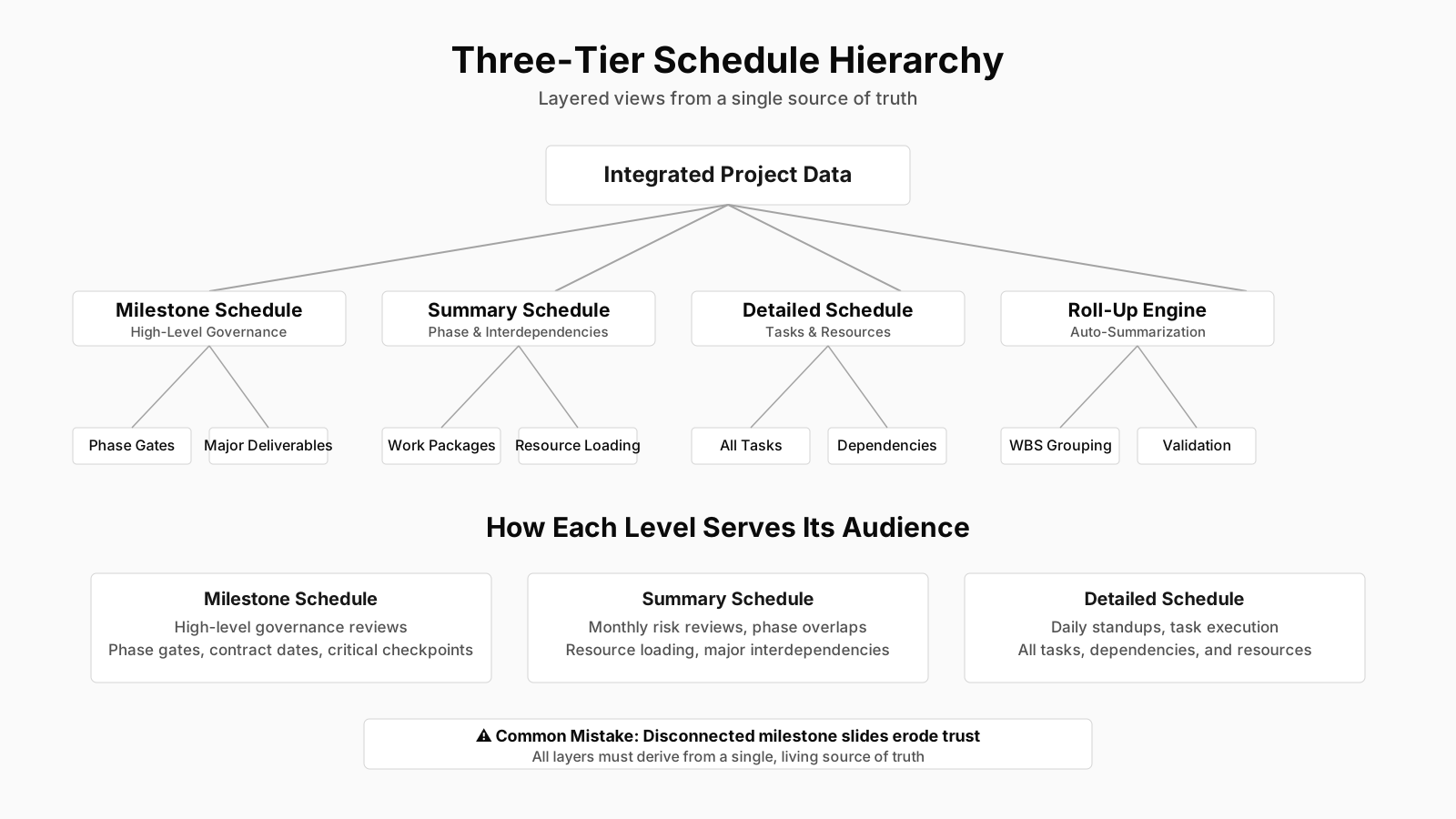
The schedule hierarchy in project management mirrors the way organizations decompose strategy into operational tasks. At the top, executives need a crisp view of major commitments and phase gates. In the middle, functional managers and team leads require enough structure to coordinate resources across departments without drowning in minutiae. At the bottom, individual contributors and project controllers wrestle with task sequences, durations, and daily handoffs. This layered approach is so deeply ingrained that most scheduling methodologies and software tools explicitly support multiple schedule views derived from the same underlying data. In PMBOK terms, the steps of Plan Schedule Management, Define Activities, and Sequence Activities gradually build the foundation for these three tiers, yet practitioners often select one tier as the primary communication artifact and neglect the others.
What makes the hierarchy powerful is not just the filtering of information but the alignment with different decision cycles. A milestone schedule supports governance reviews every quarter or month. A summary schedule guides monthly resource allocation and risk check-ins. The detailed schedule drives weekly or daily standups and progress updates. PRINCE2 frameworks embed a similar philosophy with management stages and team plans, where stage boundaries act as milestones and the stage plan functions as a summary-level artifact. Even in Agile environments, release roadmaps often resemble milestone schedules, sprint backlogs approximate detailed plans, and epics or feature groupings serve as summary-level containers. Skilled program managers deliberately maintain these parallel layers because a single flattened schedule rarely satisfies everyone.
One common misstep is treating the detailed schedule as the single source of truth and trying to compress it into a summary report by simply hiding tasks. That approach usually leads to summary bars that inherit all the underlying task constraints, producing a cluttered bar chart that completely misses the point of a clean summary view. Instead, effective practitioners curate summary schedules by grouping work packages in a way that reflects organizational accountability and budget control accounts, not just a collapsed tree structure. The schedule hierarchy is therefore an active design choice, not an automated print option.
Core Takeaways on Schedule Hierarchy
- Three-tier schedule hierarchy
- A tiered structure aligns focus: executives monitor milestone delivery to safeguard enterprise objectives, managers orchestrate resources across functions to meet those milestones, and contributors execute precise task sequences and daily transitions.
- Tools support multiple views
- Leading scheduling tools and frameworks produce tailored views from a single data foundation, surfacing only the information each stakeholder group needs for its decision-making.
- PMBOK builds the foundation
- The PMBOK sequence of Plan Schedule Management, Define Activities, and Sequence Activities lays the structural groundwork for all three tiers, yet practitioners often fixate on one tier as their primary output, inadvertently starving the others of the attention they need.
- PRINCE2 and Agile parallels
- PRINCE2 enforces management stage boundaries as milestone gates supported by summary plans, and Agile practices recast the hierarchy through release roadmaps for strategic oversight, sprint backlogs for team alignment, and epics that cluster contributor-level stories.
- Curate summaries around accountability
- Instead of collapsing the task tree into an unreadable maze of bars, the most effective practitioners build summary views around organizational accountability and budget control accounts, delivering clarity tailored to each governance function.
Defining the Milestone Schedule
The milestone schedule is instantly recognizable by its diamond markers on a timeline, each representing a major event or completion point. Unlike activity bars that span days or weeks, milestones carry zero duration. They stand as sharp, discrete signals along the project timeline: a design approved, a prototype delivered, a gateway review passed, a regulatory submission filed. By stripping away all activity detail, the milestone schedule forces attention to outcomes rather than effort. Executives, steering committees, and external stakeholders gravitate toward this format because it answers the only question they care about in many meetings: are we hitting the big markers on time?
Creating a milestone schedule demands discipline in identifying the truly significant points. Mere task completions are not milestones; a milestone must represent a decision point, a deliverable acceptance, or a handoff between phases. In PMBOK, the milestone list is an output of the Define Activities process and can be presented as a standalone schedule or embedded in a more detailed view. Many contracting arrangements use milestone schedules as the basis for progress payments, making the clarity of milestone definitions a commercial necessity. A vaguely worded milestone like “testing phase ended” invites dispute, while “customer acceptance testing completed with signed verification” ties the event to an objective, verifiable condition.
Because milestones have no duration, they reveal nothing about the effort required to reach them. A milestone schedule that seems neatly spaced may hide enormous resource peaks lurking between those diamonds. This limitation is often underestimated by stakeholders who treat the milestone timeline as a guarantee of steady progress. Experienced project managers therefore pair milestone schedules with summary-level discussions about workload or resource heat maps, even if the visual stays clean. In Agile contexts, milestones might correspond to sprint reviews, release dates, or PI planning boundaries. They serve as anchor points that align the team’s iterative delivery with external commitments without dictating the daily flow of work.
When to Use a Milestone Schedule
Milestone schedules excel when the primary audience lacks the time or technical background to absorb activity-level detail. Project sponsors, portfolio review boards, and client executives often see only the milestone view. It works equally well as a framing device at project kickoffs, giving everyone a shared mental model of the journey’s key junctures. In regulated industries, milestone schedules also become audit artifacts that demonstrate phase-gate compliance. The pitfall arises when the milestone schedule is updated in isolation without reflecting adjustments made in the underlying detailed plan, creating an inconsistent version of truth that can erode trust.
Defining the Summary Schedule
A summary schedule consolidates related activities into larger work packages and displays them as aggregated work package bars without revealing the internal task breakdown. This format operates at a level where one bar might represent an entire design phase or a procurement cycle, spanning weeks or months. It strikes a middle ground between the starkness of milestones and the density of a fully networked Gantt chart. Department heads find summary schedules particularly useful because they show when their teams will be heavily loaded without forcing them to track individual assignments in a project meeting.
Constructing a meaningful summary schedule requires consciously grouping activities that share a common deliverable or accountability. Blindly rolling up tasks based on a work breakdown structure code can yield a summary bar that masks overlapping or confused handoffs, so experienced schedulers verify that the aggregated work package has a coherent output. The bar itself inherits the earliest start and latest finish of its constituent activities, which means its length and position can shift if any child activity moves. This behavior makes summary schedules sensitive to detailed plan changes even though the root causes remain hidden from the summary view.
Summary schedules serve as excellent tools for rolling wave planning, where near-term work is detailed while future phases exist only as high-level work packages. By freezing summary bars for distant phases and progressively elaborating them as the project advances, the team avoids the pretense of false precision. In practice, many project managers maintain a summary schedule as the primary mechanism for resource-leveling discussions, reserving the detailed schedule for daily tactical coordination. The summary view also helps with stakeholder alignment during scope negotiations, as adding or removing an entire work package bar visibly reshapes the timeline without bogging down discussions about individual tasks.
Common Applications of Summary Schedules
Beyond resource planning, summary schedules are frequently used during risk identification workshops. When risk facilitators overlay risk events on high-level bars, participants can more easily spot periods of overlapping high-risk activities without getting lost in task micro-detail. The format also supports contract negotiations where the project delivery timeline must be expressed at a level corresponding to contractual milestones but with enough phasing to show how different scopes interrelate. Many monitoring and controlling dashboards pull data from summary schedules to populate traffic-light indicators for each work stream.
Key Insights on Summary Schedules
- Aggregated work package bars
- A summary schedule aggregates interrelated tasks into consolidated work packages, representing them as bars that conceal detailed sub-tasks and span durations of weeks or months.
- Dynamic bar positioning
- Every summary bar automatically reflects the earliest start date and latest finish date of its underlying activities, causing its duration and placement to adjust dynamically with any change to a subordinate task.
- Planning and alignment tool
- Such schedules enable rolling wave planning, act as the cornerstone for resource leveling conversations, and facilitate stakeholder alignment throughout scope negotiations.
Defining the Detailed Schedule
When need to expose every activity and its logical relationships, you turn to a detailed schedule logic bar chart, also known as a time-scaled precedence diagram. This format decomposes each work package into its fundamental activities and explicitly shows finish-to-start, start-to-start, and other dependency links. A data date, often represented by a vertical line, indicates the progress reporting line from which remaining work is measured. The detailed schedule is the engine room of project control; it feeds critical path analysis, earned value management, and resource loading.
Building a credible detailed schedule demands not just listing activities but sequencing them with authentic logic. Soft links, hard constraints, and lags can all distort the network if applied carelessly. In the PMBOK framework, this is where Sequence Activities, Estimate Activity Durations, and Develop Schedule converge to produce a schedule model that can be analyzed for float, near-critical paths, and compression opportunities. The level of detail must be appropriately balanced: too coarse and you lose the ability to spot daily slippage; too granular and the schedule becomes unmaintainable. A rule of thumb many practitioners follow is that the smallest activity should be no shorter than the reporting period, often one week for larger projects, down to a day for rapid development environments.
The BVOP methodology offers a cautionary perspective here, noting that excessive decomposition can introduce inaccuracies because detailed estimates carry compounding uncertainty. Instead of fixating on task-level precision, BVOP encourages relational effort points and treat scope change as user feedback rather than plan failure. This mindset keeps detailed schedules adaptable while recognizing that a Gantt chart with two hundred tiny tasks tied to rigid dates often becomes a fiction within weeks. Still,for most predictive projects, the detailed schedule remains indispensable for day-to-day management, contractor coordination, and forensic delay analysis.
The Role of Activity Dependencies
A detailed schedule’s defining feature is its dependency logic, and getting this logic right is what separates a plausible plan from a wishful list. Finish-to-start relationships dominate most networks, but the deliberate use of start-to-start or finish-to-finish links can accurately model overlapped execution or concurrent testing. Dashboards that only show bar charts without exposing the dependency arrows can mislead stakeholders into thinking that activities float independently. Many a scheduling error has survived peer review because the reviewer only looked at dates, not the web of predecessors that constrain them. In Agile environments, while the team may not maintain a network diagram, the concept of blocking dependencies still governs sprint execution, and program-level tools often represent cross-team dependencies in a simplified precedence chart.
Comparing Milestone, Summary, and Detailed Schedules
Grasping the differences between milestone summary and detailed schedules goes beyond recognizing their visual formats. These three schedule types serve fundamentally different purposes in project communication, decision-making, and control. A milestone schedule answers “are we on track against critical commitments?” A summary schedule answers “are the major work streams progressing within their windows?” A detailed schedule answers “what exactly should the team work on tomorrow and how do today’s delays cascade?” When a project falters, it is often because one of these questions could not be reliably answered from the corresponding schedule level, prompting either a false sense of security or a reactive scramble.
One way to internalize the relationship is to picture a physical building under construction. The milestone schedule is the sign outside with the projected completion date and key phases. The summary schedule is the contractor’s bar chart in the site office showing when each trade will be on site. The detailed schedule is the foreman’s clipboard with the sequencing of deliveries, crane time, and inspection walkthroughs. All three must align, but they are created and maintained with different rhythms. The foreman updates daily, the project manager adjusts the contractor’s chart weekly, and the developer’s sign changes only if major delays force a rebaseline. This multi-speed reality leads to one of the trickiest challenges: synchronizing upward and downward propagation of changes without introducing contradiction.
Granularity Analysis Across Milestone, Summary, and Detailed Schedules
The most visible difference between milestone, summary, and detailed schedules is the granularity of information. A milestone schedule might display five to fifteen events across a year-long project. A summary schedule could show thirty to fifty work packages, each spanning weeks. A detailed schedule can easily contain hundreds or thousands of activities. That drastic variation in density means the viewer’s cognitive load changes enormously. While a milestone schedule can be absorbed in seconds, a detailed schedule requires sustained attention and domain knowledge to interpret. Project managers who present a detailed schedule in a sponsor update often watch the audience’s eyes glaze over after the third dependency explanation; those same sponsors would lean forward at a well-crafted milestone view, ready to discuss decision points.
Granularity also affects the type of variance that can be detected. A two-week slip on a milestone might be obvious from the diamond moving right on the timeline, but a two-week slip on a detailed activity might go unnoticed in a summary bar that still finishes on time because of float. Thus, each level has its own signal-to-noise ratio. Controlling levels of granularity deliberately, rather than merely zooming in and out of a single master schedule, ensures that the right level of oversight is possible without information overflow.
Dependency Logic in Milestone, Summary, and Detailed Schedules
Milestone, summary, and detailed schedules handle dependencies in sharply different ways. A milestone schedule inherently lacks dependency lines; the diamonds float on the timeline with no explicit connectors. Audiences infer sequence from the left-to-right positioning, but no tool can compute float or critical path from a milestone chart alone. A summary schedule may show dependencies between work packages, but these are often oversimplified or manually inserted, since the real dependency exists between the last activity of one package and the first of another. Tools that automatically consolidate detailed logic into summary links can generate perplexing results, such as dependencies that appear to skip intervening work packages. The detailed schedule is the sole level where every dependency is explicitly modeled and can be analyzed for impact, making it indispensable for schedule risk analysis.
Misunderstanding this progression can cause havoc during stakeholder reviews. An executive might point to a summary bar and demand to know why it cannot start earlier, unaware that the predecessor box’s finish is driven by a single critical activity buried three layers down. The project manager must then translate the detailed logic into a summary-level explanation, a skill that develops only with practice and a deep understanding of how the three layers interconnect. Tools that support progressive elaboration partly address this by preserving traceability, but human interpretation remains the bridge.
Audience and Application of Milestone, Summary, and Detailed Schedules
Each version of a schedule finds its natural audience. The milestone schedule belongs in the boardroom and with external partners who need assurance without immersion. The summary schedule sits with work stream leaders, procurement, and resource managers. The detailed schedule lives with the core project team, the scheduler, and the cost controller. Confusing these audiences is a classic mistake: sending a detailed schedule to a sponsor who just needs to know if the project will hit the next phase gate wastes everyone’s time and can even undermine confidence if they misinterpret a minor task delay as a project crisis.
Beyond who receives them, the three schedule types also shape different organizational behaviors. A milestone culture fosters outcome accountability, because nobody can hide behind a long list of completed tasks if the milestone hasn’t moved. A summary culture encourages resource realism, as teams negotiate around work package start and finish dates. A detailed culture demands discipline in updating and maintaining the data, which some organizations lack. Matching the schedule style to the organizational maturity is as important as matching it to the audience.
Key Takeaways on Schedule Level Distinctions
- Audience-specific communication tool
- Each schedule level answers a distinct question, so calibrating detail to the audience prevents misinterpretation, disengagement, and misplaced confidence during project reviews.
- Multi-speed update cadence
- The foreman updates the detailed schedule daily, the project manager refreshes the summary chart weekly, and the developer revises the milestone view only when significant delays require a rebaseline.
- Float masks hidden slippage
- A two-week delay on a detailed activity can remain invisible in a summary bar that still meets its finish date, because available float absorbs the slip and conceals emerging schedule pressure.
- Downward propagation challenges
- Keeping changes synchronized both upward and downward across schedule levels is a persistent difficulty, as contradictory updates between levels erode trust in the schedule and undermine reliable decision-making.
- Buried critical dependencies
- When executives question why a summary bar cannot start earlier, they often overlook a single critical predecessor activity buried deep in the detailed schedule that ultimately drives the constrained start date.
Common Misconceptions and Pitfalls
Many practitioners mistakenly believe that a summary schedule is simply a course-grained version of the detailed schedule, automatically generated by collapsing a work breakdown structure branch. While tools can produce such a view, a true summary schedule designed for communication must be curated. It should group activities in a way that reflects management ownership, budget lines, and reporting cycles, not merely a tree branch. The difference becomes stark when a work package spans multiple responsible managers; an automatic roll-up hides that fragmentation behind a single bar, masking accountability gaps. Curated summary scheduling manually creates bars for each accountable entity, even if it means splitting a WBS element across two visual bars.
Another widespread pitfall is assuming that a milestone schedule can be accurately maintained without a detailed underlying plan. It is tempting to manage a project exclusively with milestones, especially in environments with strong phased gate governance. Over time, however, the absence of activity logic erodes the ability to forecast realistic milestone dates. The milestone schedule becomes a collection of wishful dates that drift until a crisis forces a schedule re-crew. A robust project control environment ensures that milestones are linked, directly or through the summary schedule, to the detailed plan, so that any bottom-up shift cascades upward and triggers a review. Without that linkage, the milestone schedule serves as decoration rather than a decision tool.
Finally, a subtle but dangerous misconception involves conflating the level of detail with the level of accuracy. A detailed schedule with three-point estimates and a critical path calculation feels precise, but if the underlying assumptions about scope and resource availability are flawed, the precision is spurious. Conversely, a well-judged summary schedule backed by parametric estimating can be remarkably reliable. Understanding that detail does not automatically equal accuracy prevents both over-investment in elaborate schedules that drift and under-investment in proper planning for summary or milestone levels.
Practical Guidance for Schedule Integration
Effective schedule management weaves the three levels into one integrated system rather than treating them as separate documents. The detailed schedule serves as the master, with milestone dates and summary bars linked through WBS codes and activity IDs. Any progress update at the detailed level should immediately reflect in rolled-up percent complete at the summary level and trigger a variance flag on affected milestones. Many scheduling applications automate this cascade, but the project manager must still validate that the linkages are logical and that no summary bar gets stuck on a start date because all child activities have finished except one lingering task that was accidentally omitted from the roll-up.
One technique that seasoned program managers employ is to maintain a separate “summary-only” schedule file that draws data from the detailed file but excludes any activity-level tasks, using external predecessor relationships only to connect work packages. This prevents the summary schedule from becoming corrupted by accidental detail-level constraints and ensures it remains a true management overview. For milestone schedules, many organizations adopt a separate register that extracts the milestone list from the detailed plan but adds governance-oriented attributes like risk thresholds, decision criteria, and owner contact details. This enrichment transforms the milestone schedule from a reporting artifact into a decision-making instrument.
Integration also means synchronizing the update rhythm. Detailed schedules might be statussed daily or weekly, summary schedules monthly, and milestone schedules only at phase boundaries or when a major rebaseline occurs. If a milestone is missed, the project manager should trace down through the summary and detailed levels to understand the root cause before reporting upward. Conversely, if a milestone is relaxed due to executive negotiation, the detailed schedule must absorb that change and recompute the network to avoid unrealistic successor dates. This bidirectional flow requires both technical configuration and a disciplined change management process, otherwise the three levels diverge until none of them can be trusted.
Organizations that embed these three schedule levels into their project management methodology, complete with entry and exit criteria for each level and clear ownership roles, experience fewer nasty surprises. Milestones become the backbone of governance, summary bars steer resource conflicts, and the detailed network powers execution. The effort to build and maintain all three might seem duplicative, but the reality is that each level serves a constituency that would otherwise misread a differently-grained plan and make poor decisions. Project schedules are communication tools as much as planning instruments, and communicating effectively with multiple audiences demands multiple views.
Core Insights on Schedule Integration
- An integrated system, not separate documents
- A robust schedule integrates detailed, summary, and milestone views into one cohesive system, linked through WBS codes and activity IDs, with the detailed plan serving as the authoritative master record.
- Validate automated progress roll-ups
- While scheduling tools automatically propagate progress updates, project managers must verify that logical ties are intact and that no summary bar remains frozen at its start date due to an inadvertently excluded child activity.
- Maintain a summary-only schedule file
- Seasoned program managers maintain a dedicated summary-only schedule file that sources data from the detailed plan but omits activity-level detail, relying on external predecessor links exclusively to connect work packages and safeguard the high-level perspective.
- Trace root causes across levels
- Whenever a milestone is missed, the project manager should drill down through summary and detailed levels to pinpoint the root cause before reporting upward; similarly, any relaxed milestone must be embedded into the detailed schedule so the network logic can recalculate credible successor dates.