Virtual teams are groups of people with a shared goal who fulfill their roles with little or no time spent meeting face to face. The benefits of using virtual teams show up across project planning, execution, and portfolio selection, but they are most visible when geographic distance or travel costs would otherwise stop a project from starting. Organizations frequently turn to virtual team structures because they allow people to contribute from different locations, time zones, and work environments without losing the coordination that project goals require.
This definition matters because it shifts the focus away from physical presence and toward shared purpose and role clarity. A virtual team is not simply a group of remote workers with occasional calls. It is a project team that relies on electronic communication as the primary connective tissue. E-mail, audio conferencing, web-based meetings, and video conferencing make this possible, but the viability of the team depends on how deliberately communication and expectations are managed.
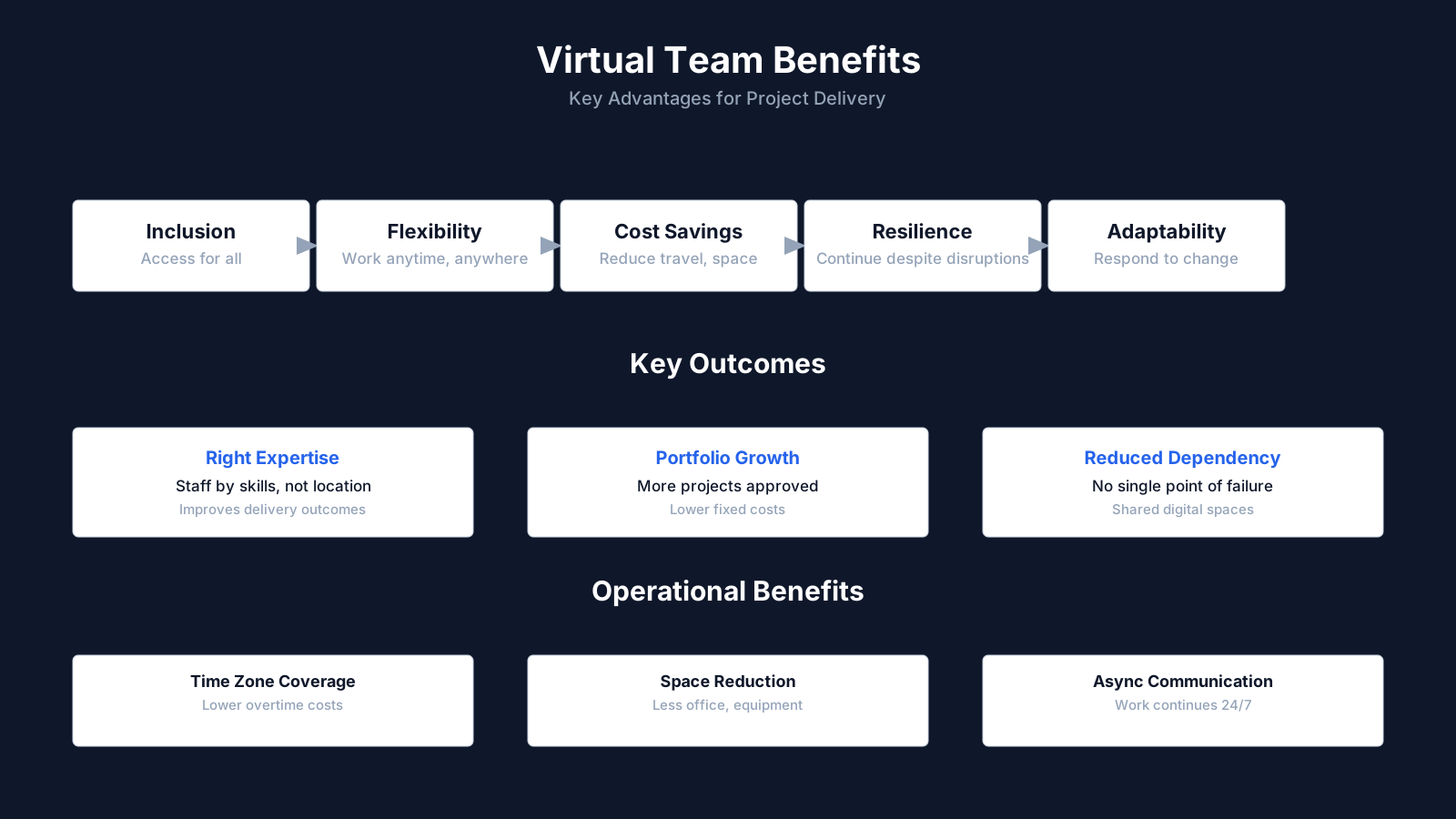
Key Benefits of Virtual Teams: Summary
| Key Concept | Summary |
|---|---|
| Strategic value of virtual teams | Virtual teams create measurable advantages in planning, execution, and portfolio selection, particularly when geographic distance or travel expense would otherwise render a project infeasible. |
| Location and time zone flexibility | Virtual structures enable contributions across multiple locations, time zones, and work settings while preserving the coordination required to achieve project objectives. |
| Access to specialized expertise | Project teams can draw on employees from dispersed regions, engage specialized experts regardless of physical proximity, and integrate remote home office staff into core delivery roles. |
| Accessibility and participation | Virtual arrangements eliminate physical access constraints, enabling skilled contributors to participate fully without commuting or navigating inaccessible workspaces. |
| Operational process improvements | Incremental improvements that depend on input from multiple regional managers become economically viable without the burden of in-person workshops that would otherwise make the initiative impractical. |
| Cross-regional collaboration | A multinational organization can bring together a quality lead, a logistics analyst, and a finance representative into a single initiative without requiring relocation or extended travel. |
| Structured communication for distributed teams | Distributed teams must replace informal hallway conversations with deliberate documentation in shared files, structured meeting notes, and clearly assigned action items. |
| Inclusive talent management | Managing remote contributors as accountable core team members with defined assignments and deadlines broadens the talent pool and improves retention among professionals unable to commute or relocate. |
What Are the Benefits of Using Virtual Teams for Project Delivery?
The most direct virtual team benefits are tied to the ability to bring the right people together without relocating anyone. Organizations can form teams of employees from the same company who live in widespread geographic areas, add special expertise even when the expert is not physically nearby, and incorporate people who work from home offices. This flexibility changes how project managers think about staffing because the best available person no longer has to be in the same building or the same city.
Project teams can also include people who work different shifts or hours, which broadens the candidate pool. When a project requires round-the-clock progress, having team members in different time zones can become a structural advantage rather than a barrier. The same logic applies to employees with mobility limitations or disabilities. Virtual team arrangements can remove many physical access obstacles, allowing skilled contributors to participate fully without commuting or navigating an inaccessible workspace.
There is also a portfolio-level benefit. Some projects are ignored because the cost of travel alone makes them hard to justify. Moving forward with projects that would have been ignored due to travel expenses is a practical outcome of virtual team capability. A modest process improvement that needs input from three regional operations managers might be dismissed if it requires multiple in-person workshops. The same project can become viable when virtual collaboration tools replace the need for those trips.
Benefits of Using Virtual Teams for Geographic Reach
One of the most practical applications of virtual teams is forming a project group from employees who are spread across many regions of the same company. A firm with operating sites in different countries can pull a quality lead from one region, a logistics analyst from another, and a finance representative from headquarters into a single initiative without relocation or extended travel. This keeps local expertise anchored where it is most useful while still allowing it to inform company-wide projects.
Geographic distribution also brings different perspectives on how work actually gets done. The project manager does not have to rely on secondhand descriptions of regional constraints when someone from that region is already on the team. That said, distance creates a need for more explicit coordination. What a colocated team might absorb through hallway conversations, a distributed team has to capture in shared documents, meeting notes, and clearly assigned actions.
Adding Specialized Expertise Without Relocation
Virtual team models let organizations add specialist knowledge that may not exist in the project's primary location. A niche technical consultant, a regulatory reviewer, or a data privacy expert can contribute to the team from another city or country without the cost and delay of relocation. This is especially valuable for short-term project phases where moving someone permanently would make no sense.
There is an important nuance here. Including a specialist virtually is not the same as sending them an occasional e-mail. The specialist needs access to the same project information, the same update cadence, and the same decision forums as everyone else. Otherwise the team gains a title on paper but not actual expert contribution. Project managers often underestimate how much onboarding and inclusion work is required for a distant expert to become a real participant rather than an outside reviewer.
Key Benefits of Virtual Teams
- No relocation needed for expertise
- Organizations can assemble the strongest available talent regardless of location, so the ideal candidate no longer needs to work from the same city or office as the rest of the project team.
- Hours and time zones become assets
- Distributed schedules and time zones allow the team to maintain continuous progress around the clock, while also expanding the pool of candidates available for staffing decisions.
- Improved access for disabled employees
- Remote work removes physical barriers such as difficult commutes and inaccessible office environments, enabling skilled contributors with mobility limitations to participate fully in project delivery.
- Remote setup lowers project costs
- With travel and in-person workshops no longer required, organizations can pursue modest process improvements and cross-region initiatives that would previously have been considered too expensive to attempt.
Enhancing Workforce Flexibility Through Virtual Team Structures
Virtual team structures create flexible working arrangements that would be difficult to replicate in a purely office-based project. Employees who work from home offices become full participants, not peripheral contributors. This is more than a convenience; it expands the available talent pool and supports retention for people whose personal circumstances make daily commuting or relocation impractical.
Benefits of Using Virtual Teams for Home Office Inclusion
Many organizations already have employees who work from home at least part of the time. Virtual teams formalize that arrangement for project work. Instead of treating a home-based employee as someone who dials in when absolutely necessary, the project plan treats them as a core team member with assignments, deadlines, and accountability. This consistency reduces the drift that can occur when remote contributors feel like optional observers.
Home office inclusion also affects how project managers handle performance and communication. A person working from home cannot rely on the same visual cues that a colocated employee uses to judge whether a task is urgent or whether a stakeholder is satisfied. Regular written updates, clear task definitions, and scheduled check-ins become necessary. That requires effort at the start, but it often improves discipline for the entire team, including those in the office.
Supporting Different Shifts, Hours, and Time Zones
Virtual teams can include people who work different shifts or hours, which is especially relevant for operations that run continuously. A project that needs input from a night-shift supervisor and a day-shift engineer can bring both into the same virtual room without forcing either person to attend a meeting in the middle of their sleep window. The project schedule can be built around asynchronous updates and rotating shared meeting times.
This can also create a follow-the-sun effect. When team members in Europe finish their working day, colleagues in North America can continue reviewing deliverables, and later team members in Asia can push the work further. That does not happen automatically. Handoffs need to be structured so that the next group knows exactly what is pending, what decisions were made, and where to find the current version of the product. Without that discipline, different hours become a source of delay rather than an advantage.
Virtual Team Cost Efficiency and Project Selection Benefits
Cost savings from virtual teams are often framed around reducing travel expenses, but the more significant effect may be on which projects get approved at all. When travel is a major line item, organizations often defer or kill initiatives that would otherwise deliver value. Virtual team structures remove a common budget barrier and change the calculus for project selection.
Benefits of Using Virtual Teams for Travel Cost Reduction
Travel expenses include airfare, lodging, meals, ground transportation, and the lost time spent in transit. In a multi-location project, these costs can grow quickly, especially if the project requires recurring workshops or face-to-face steering committee meetings. A virtual team does not eliminate all travel, some projects may still benefit from an initial kickoff or occasional in-person session, but it sharply reduces the frequency and urgency of those trips.
Reducing travel also has a second-order effect on team morale and productivity. Project participants who are not constantly packing and commuting have more energy for the actual project work. There is a common assumption that a two-day on-site workshop is always more productive than two days of virtual collaboration. That assumption often overlooks the exhaustion and lost time that travel creates. Virtual collaboration may feel less intense in the moment, but it can produce more consistent progress over the life of the project.
Moving Forward With Projects That Would Otherwise Be Ignored
The source material is direct: virtual teams make it possible to move forward with projects that would have been ignored due to travel expenses. This is a portfolio management insight as much as a team management insight. A project with a modest expected benefit may fail a cost-benefit test if it includes several thousand dollars or more in travel costs. The same project may clear the threshold when those costs are removed or reduced.
This shifts how executives and project sponsors evaluate opportunities. Instead of asking whether a project is important enough to justify bringing everyone together physically, they can ask whether the project has enough value to justify the time of the people involved. Travel costs often distort that evaluation by adding a fixed, highly visible expense that is not actually essential to the outcome. Virtual teams allow the value of the project itself to drive the decision more directly.
Key Insights on Virtual Cost Advantages
- Project approval calculus changes
- Virtual team structures remove travel budget constraints that frequently lead organizations to defer or reject initiatives with otherwise strong business cases.
- Travel expense components reduced
- Airfare, lodging, meals, ground transportation, and nonproductive transit time represent the largest travel cost categories, all of which decline substantially under virtual team models.
- Travel not fully eliminated
- Selective in-person sessions, such as project kickoffs or milestone reviews, can still add value, yet virtual teams lower both the frequency and the perceived urgency of business travel.
- Second-order morale benefits
- When team members spend less time on packing, commuting, and travel logistics, they can redirect that energy toward project execution, which strengthens morale and output quality.
- Travel costs distort evaluations
- Travel expenses function as a fixed and highly visible cost that bears little connection to project outcomes, and virtual structures eliminate this distortion from how initiatives are evaluated.
Communication Technologies That Make Virtual Teams Feasible
None of the benefits above would be possible without reliable virtual team communication tools. The notes emphasize that electronic communication such as e-mail, audio conferencing, web-based meetings, and video conferencing makes virtual teams feasible. Each of these tools serves a different purpose in the team's communication rhythm, and project managers need to understand when each is most useful.
E-mail, Audio Conferencing, and Web-Based Meetings
E-mail supports asynchronous communication and creates a written trail for decisions, questions, and document sharing. It is not ideal for rapid back-and-forth discussion or sensitive conflict resolution, but it works well for distributing meeting agendas, action items, and status updates. The risk with e-mail is overload. When every minor issue becomes an e-mail thread, the team can drown in fragmented information and miss the few messages that actually require attention.
Audio conferencing fills the gap for real-time discussion when visual presence is not critical. It works for daily check-ins, quick problem-solving calls, and discussions where team members already know each other. Web-based meetings add screen sharing and document collaboration, which helps when the team needs to review a deliverable together, mark up a schedule, or walk through a technical issue. These tools reduce the need for face-to-face meetings while preserving the ability to interact live.
Video Conferencing and Real-Time Collaboration Tools
Video conferencing adds the visual cues that audio calls lack. Team members can see facial expressions, detect confusion, and read the room during difficult conversations. This is particularly valuable for initial relationship building, performance discussions, and complex trade-off decisions where body language matters. Video is not always necessary for every meeting, but having it available gives the project manager a stronger tool for high-stakes moments.
The choice of tool should follow the communication need, not the other way around. A project manager who schedules a video call for a simple status update may be burning attention and bandwidth without adding value. A project manager who tries to resolve a deep conflict by e-mail is likely to make the conflict worse. The toolset is only as effective as the communication planning that sits behind it.
Communication Planning in a Virtual Team Environment
Effective virtual teams require deliberate virtual team communication planning. The source material emphasizes that communication planning becomes increasingly important in a virtual team environment. Additional time may be needed to set clear expectations, facilitate communications, develop protocols for resolving conflict, include people in decision-making, and share credit in successes. This is not just a nice-to-have checklist; it is the operating system of the team.
Setting Clear Expectations and Facilitating Communications
In a colocated team, many expectations are communicated informally through daily interaction. A quick nod, a brief conversation by the coffee machine, or a spontaneous whiteboard session can align people without a formal process. Virtual teams do not have that default mechanism. If a project manager does not explicitly define response times, meeting norms, deliverable formats, and escalation paths, the team will invent its own inconsistent habits.
A virtual team operates more like a distributed company than a roomful of colleagues. The project manager has to build the walls, doors, and hallways that physical space used to provide. Without a documented communication rhythm, a team member in one time zone may wait half a day for a response that another person thought could wait until the next scheduled call. Those small gaps accumulate into schedule slippage and frustration.
Developing Protocols for Conflict Resolution and Inclusive Decision-Making
Conflict is harder to detect in virtual settings because people can disengage quietly. A team member who disagrees may simply stop contributing rather than voice the disagreement. For this reason, protocols for resolving conflict should be established early. The team needs a clear way to raise concerns, challenge an approach, and reach a decision without letting the conversation turn into a long e-mail chain or a series of passive-aggressive comments in shared documents.
Decision-making also needs to be inclusive. In virtual teams, it is easy for the most vocal participants on a call to dominate while quieter members remain silent. Facilitation techniques such as going around the virtual room, using structured polling, and documenting decisions in writing help ensure that everyone has a chance to influence outcomes. Sharing credit in successes is part of the same dynamic. Because contributions are less visible from a distance, the project manager has to make an extra effort to recognize the person who solved a problem or completed a quiet but critical task.
Core Insights on Virtual Communication Planning
- Planning is the operating system
- Effective virtual teams treat communication planning as their fundamental operating system because deliberate structure replaces the informal alignment that co-located teams gain from daily interaction.
- Explicit expectations replace informal cues
- Project managers must formally define response times, meeting norms, deliverable formats, and escalation paths because the quick nods, hallway conversations, and spontaneous whiteboard sessions that align physical teams no longer occur naturally in distributed settings.
- Managers build virtual infrastructure
- The project manager acts as the architect of the team's virtual environment by deliberately constructing the communication channels, meeting spaces, and access points that a physical office would have provided by default.
- Documented rhythms prevent breakdowns
- Without a documented communication rhythm, team members in different time zones encounter delayed responses and unresolved concerns, so clear protocols should be established for raising issues, challenging approaches, and making decisions without relying on lengthy email chains or ambiguous comments in shared documents.
Managing Virtual Team Performance and Accountability
Virtual collaboration changes how performance becomes visible. Effective virtual team performance management relies on clear deliverables, shared tracking systems, and regular check-ins rather than physical observation. Without these mechanisms, remote contributors can drift out of alignment or feel their work is not seen.
Tracking Deliverables and Making Progress Visible
In a colocated setting, a project manager might gauge progress by walking around the room or noticing who is at their desk late. Virtual teams do not allow that kind of passive observation. Instead, the team needs a shared task board, a visible schedule, and documented status updates. These tools create a record of what is moving forward and what is stuck, which benefits everyone regardless of location.
Shared tracking also reduces the risk of duplicate work or missed handoffs. When a team member updates a task status, the next person in the workflow sees the change immediately. That may sound obvious, but many virtual teams still rely on fragmented spreadsheets or personal notes. The more dispersed the team, the more important it becomes to have one version of the truth for project status.
Conducting Regular Check-Ins and Feedback Loops
Regular check-ins do not have to be long. A short daily or weekly call can resolve small ambiguities before they become large misalignments. Feedback in a virtual team should be specific and timely because there is no hallway conversation to soften the message or clarify intent. Project managers often find that written feedback alone can feel harsher than intended, so pairing written notes with a brief audio or video conversation helps preserve tone.
Performance accountability also involves recognizing contribution. In a virtual team, some people work very effectively but quietly. If the project manager only notices the loudest voices on calls, those quiet contributors may become disengaged. Sharing credit in successes is not just a courtesy. It is a performance management practice that reinforces the behavior the project needs.
Practical Pitfalls and Misconceptions About Virtual Teams
Many virtual team challenges come from underestimating the shift in management behavior that remote collaboration requires. A common misconception is that a virtual team is simply a colocated team with fewer in-person meetings. In practice, the absence of physical proximity changes how trust develops, how information flows, and how accountability is perceived.
Common Misconceptions in Managing Remote Team Dynamics
One misconception is that virtual teamwork saves time by default. It can save travel time, but it often demands more time for coordination. The project manager may need to prepare more structured agendas, write more explicit instructions, and follow up more deliberately than in a colocated setting. If that coordination time is not planned, the project may appear to move faster at first and then stall when misalignment surfaces.
Another misconception is that asynchronous work means less accountability. Some stakeholders assume that because people are not physically present, they are less engaged. The opposite can be true when the team has clear deliverables and a transparent tracking system. Virtual work makes contributions more visible if the project manager uses shared dashboards and task boards. However, without those systems, remote contributors can become invisible and overlooked.
Avoiding Mechanical Application of Virtual Team Models
Not every project should default to a virtual team structure. Some work benefits from physical presence, especially tasks involving sensitive negotiations, hands-on prototyping, or deep relationship building in a new partnership. Applying a virtual model mechanically to every initiative can create more friction than value. Project managers should assess the nature of the work, the maturity of the team, and the available communication infrastructure before committing to a mostly virtual approach.
There is also a risk of confusing virtual collaboration with constant connectivity. A team that is spread across time zones can drift into an always-on culture where someone is expected to respond at all hours. This is not a sustainable benefit. The source notes that different shifts and hours can be an advantage, but only if boundaries are respected. A thoughtful virtual team plan protects offline time and creates predictable windows for real-time interaction.
Core Insights on Remote Team Pitfalls
- Management behavior shift underestimated
- Many virtual team challenges stem from leaders underestimating how profoundly remote collaboration reshapes their daily management routines and decision-making habits.
- Not just fewer in-person meetings
- Viewing a virtual team as merely a colocated team with fewer in-person meetings overlooks how physical distance fundamentally reshapes trust development, information flow, and perceptions of accountability.
- Time savings are not automatic
- Without deliberate investment in structured agendas, explicit instructions, and systematic follow-up, projects often appear to move quickly at first but then stall as misalignment emerges.
- Remote presence does not mean disengagement
- Remote contributions become more visible when project managers rely on shared dashboards and task boards, turning physical distance into a transparency advantage rather than a source of distraction.
- Some tasks still need physical presence
- Sensitive negotiations, hands-on prototyping, and the early stages of building deep partnerships usually benefit from in-person interaction and should not be forced into a remote format when reading subtle cues is essential.
Virtual Teams Within Broader Project Management Frameworks
Virtual team practices fit into several established project management frameworks, and understanding that placement helps project managers apply the right processes at the right time. In PMBOK terms, virtual teams are most relevant to Project Resource Management and Project Communications Management, particularly during planning and executing. The resource management plan identifies how the team will be staffed and developed, while the communications management plan defines how information will be shared across locations.
PMBOK Process Groups and Knowledge Area Connections
During the planning process group, the project manager determines whether virtual team members are needed and how their inclusion will affect communication, risk, and schedule. The resource management plan may specify which roles can be performed remotely and which require site presence. The communications management plan then translates those decisions into practical routines, such as which meetings are held by video, which updates are distributed by e-mail, and where shared documents are stored.
During project execution, Develop Team and Manage Communications become especially important. Developing trust among people who rarely meet face to face requires deliberate team-building activities and regular feedback loops. Managing communications means not only sending messages but also confirming that they were understood. A virtual team often exposes weaknesses in an organization's communication habits because there is less room for ambiguity to be absorbed by informal contact.
Agile, PRINCE2, and BVOPM Perspectives
Agile and Scrum teams often work in distributed settings, using daily standups via video, shared digital backlogs, and asynchronous collaboration for code reviews or document updates. The principles are similar to traditional virtual teams, but the cadence is shorter and the feedback loops are more frequent. This can reduce the risk of misalignment because the team checks in more often, but it also requires a reliable communication infrastructure and a strong facilitator.
PRINCE2 environments typically address virtual team communication through the Communication Management Approach, which defines how and when information is exchanged among the project board, project manager, and team members. The emphasis on management products and clear roles fits well with virtual work because documentation becomes the shared reference point when people cannot simply turn to a neighbor and ask a question. Organizations applying BVOPM may also treat employee-created tools and open-source software as formal products, and cross-functional teams as a core success factor, which influences how virtual team outputs are governed and recognized.
Virtual team benefits do not come from the technology alone. They come from the combination of the right people, clear communication planning, and a project management approach that treats distance as a manageable constraint rather than an excuse for weaker coordination. The organizations that get the most out of virtual teams are usually the ones that invest in the less visible work: setting expectations, resolving conflict early, including everyone in decisions, and making sure credit is distributed fairly. That work takes time, but it is what turns a collection of remote individuals into a real project team.